Pages

Showing posts with label Chromebooks. Show all posts

Sunday, February 17, 2019

Rights and Responsibilities

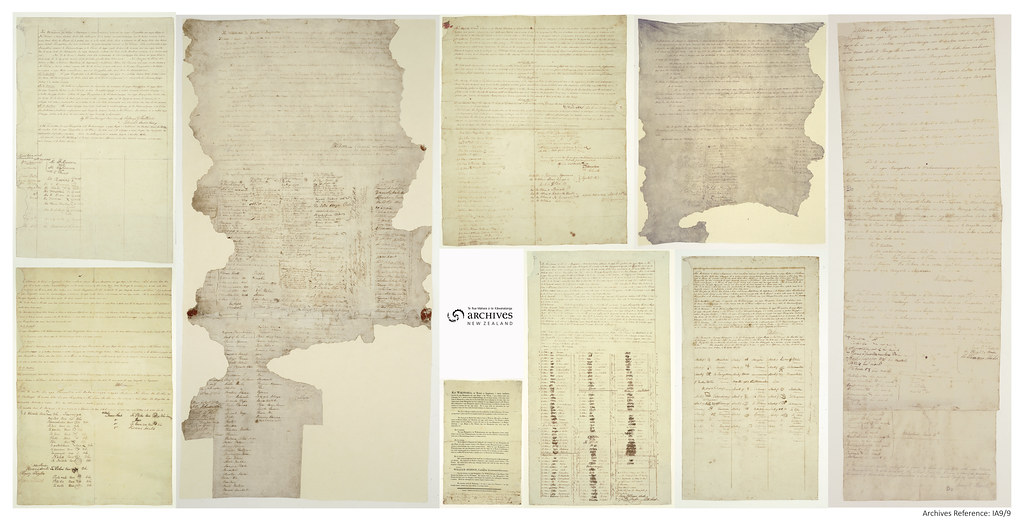
Kaiwhare has been very busy in Week 2, learning more about the Treaty of Waitangi. Did you know that some Māori signed the Treaty with a mark showing a pattern from their tā moko (tattoos on the face) or from their area?  You can see them on the eight sheets of the Treaty that travelled around New Zealand from February to September 1840.
Photo: Archives New Zealand
We have started developing our class treaty, to explain our rights and responsibilities as we learn.  We've also started some artwork, using symbols to represent ourselves and our families in different ways.

In cybersmart, we are learning about using our chromebooks safely and our responsibilities for looking after them - our Kawa of Care.

Some of our parents have been invited to a meeting to learn about their responsibilities with their child's new chromebooks too. (Remember to send back the form that was sent home with your preferred meeting time!)


We practised:
  • moving carefully around the class
  • holding our chromebook with our "thumbs up" 
  • typing gently on the keyboard and closing the screen softly, so it doesn't click
  • putting the chromebook in a safe position on a desk, and turning it carefully with two hands
  • logging off the chromebook when we finish working, and storing it safely
Then we made a digital poster sharing at least one of the Kawa of Care responsibilities. 
Check out Freddy's poster below.


Thursday, February 7, 2019

Welcome to 2019 - Out of the box day


The 2019 school year started for Kaiwhare today and we have had a very exciting first day.  We spent time getting to know our new friends and class mates making connections with others in our syndicate.

It was great to share "The Treehut Treaty" a valuable story with an important message. This helped us to describe what we would like our classes to be like. It will help us to come up with ideas for our syndicate treaty too.

After morning tea, we worked collaboratively to talk about how we could look after the Chromebooks that we will be using for our learning this year.  We then opened our new chromebooks and explored  our new syndicate site. It was great to get up and running and we are really looking forward to sharing our learning with you on our blogs. Please check back regularly to see what we have been doing.


Sunday, July 1, 2018

Week 9 - Our own student led toolkits

On Friday, all of our senior school students were involved in student led toolkits.  Earlier in the term, 24 students from Te Waka Ako attended the cluster toolkits, you can read about these in this post.

Our aim was to bring the learning back from the cluster day and share it with all of the other Year 5s and 6s at our school.  This meant that from 9:15-12:45 students ran and participated in lots of different workshops that help us to use and create in interesting ways.  You can see all of the presentations and the things that the students were involved in on our Toolkits page on our Syndicate Site. We had a great time, found out heaps, made connections with others in our classes and even had the chance to present the learning to our Principal Mrs Peterson too!

Our next step is to share further and wider and we are looking forward to sharing this learning with our families. It is also important for us to think of ways to use these new tools to create digitally with our learning.

If you would like to find out more, or you have any questions about our presentations or our day, please leave a comment.  You could also make connections with the presenters and their blogs too. We would love to hear from you!


Friday, June 1, 2018

Week 5: Student led toolkits

Twenty four students from across the three spaces in Te Waka Ako attended the annual Ako Hiko student led toolkits. This year we were luck to be hosted  by Christ the King school.

The student led toolkits is a great day where we get the chance to connect with kids from other schools like us that also use chromebooks for Learning, Creating and Sharing. A toolkits is a session where  children present and learn from each other.  We had two groups of presenters this year. Oscar and Abby showed how we use spheros at school for problem solving and robotics challenges. Anuk and Toby demonstrated how google slides can be used to create animations that are fun and also show our learning.  If you are interested, both of the presentations are displayed below.


It was another really successful day. The students who attended are also going to share the rest of their learning with the syndicate. We have also included a video of photo highlights from the day in the video.


Monday, September 4, 2017

Fledgling Bloggers - We love to share

This term we have a group of students new to Te Waka Ako (our classroom) and new to blogging.   We have been learning heaps of different cybersmart skills over a very short time.  Part of this has been our focus on sharing our learning. We have been working on putting together some of the things we have created.  Here are some of our first attempts at sharing.  We would love any feedback you can give us on the activities that are here.

Friday, July 28, 2017

Waikowhai Intermediate Writing Buddies

Tena Koutou.

To end our exciting first week back we were lucky enough to have a visit from our Waikowhai Intermediate writing buddies.  Last term we started some online shared writing.  Our buddies at Waikowhai Intermediate gave us some feedback about our writing and since then we have also connected to write a shared piece together about a picture prompt.


It was very exciting to meet our buddies and put a face to the name and the person we had been communicating with online. It was especially great to connect with some of the students who were previous Waikowhai Primary Students.


Throughout the session we found out about the learning maps of our older colleagues and then we spent some time crafting a new piece of writing together.  At the end of our session some of the very brave students decided to share.


We look forward to working together to create stunning pieces of writing.  Keep an eye out on our individual blogs to read the things that we are creating and sharing together as we connect with other students in our community.

Please leave us some positive, thoughtful or helpful feedback and ask us any questions to connect with us too.

Friday, March 10, 2017

How to SMRF?

One of our new challenges as we work digitally is making sure we are smart about where we store and share our files.  We have enjoyed working with James to create a flowchart that shows us the process of how we can get our learning activities from our syndicate site, make a copy of them and then organise them in our own google drives.

To do this, we call it SMRF(ing) a document.  This is to remind us what to do.

S=STOP
M=Make a copy
R=Rename the file
F=File it in our drive.

To make this process easier you will see below some flowchart examples from Room 8.
 Do you SMRF your documents too?  We would love some positive, thoughtful and helpful feedback about how you do this.  To find out more, please check out our cybersmart page.

Monday, March 6, 2017

Digital citizenship - connecting the dots

Our key concept for Inquiry this year is "Responsibility".  So far, we have been inquiring about the rights and responsibilities that we have as a student at Waikowhai Primary, a student within the senior syndicate of Rooms 7,8 and 9 and as a person who is part of the many and varied things we all do when we are not together at school.

One new area for many of us to explore (and some of us to refresh) is digital citizenship.  This means the rights and the responsibilities that we have when being an active part of our online community.  Today Mr Riceman challenged us to make some connections between key words that relate to digital citizenship.  We worked collaboratively to come up with definitions of what these words could mean.


Our next step was to identify any connections between key words and then join those two hexagons together.  If we found three words that we could connect and explain then we tessellated the shapes together and shared these ideas too.

Room 8 was full of fantastic conversation and ran ourselves short of time, we look forward to finishing off these connections tomorrow and sharing them with you!  We would love it if you gave us some feedback in the comments.  You might even be able to help us further expand our definition of the key words that you can see in our whiteboard picture.

Thursday, February 2, 2017

Welcome to 2017

Kia Ora,

Today we spent our first day together as the new Room 8.  We started our day, getting to know each other through a range of activities. It was interesting to find out about our new teachers Mrs Dron and Mr Riceman. Then we interviewed a buddy and participated in a scavenger hunt to find out more about each other. Congratulations to those of us who managed to tracked down a different class member that fitted each of the categories.

After that we spent some time thinking about top tips to look after our new chromebooks. Then, we got to take them out of the box, investigate our syndicate site, and begin creating our first google drawing to represent respect.

Here are some of the photos of our "out of the box" day, we were super excited! Please check back regularly as we update and share our learning.